
PHJOY Register: Five Fields and an Automatic Sign-In
The PHJOY register form asks for five fields and one tick box, and pressing Register signs you in at once. The form never asks for an email address, so you add one in My Account, and password recovery later depends on that saved Email. Settle the mobile number first, since the form rejects a number that another account already uses.
Check Age, Mobile Number, Password and Address Before the Form Opens
Four checks come before you register on PHJOY, and each one guards against something that goes wrong after sign-up rather than during the form.
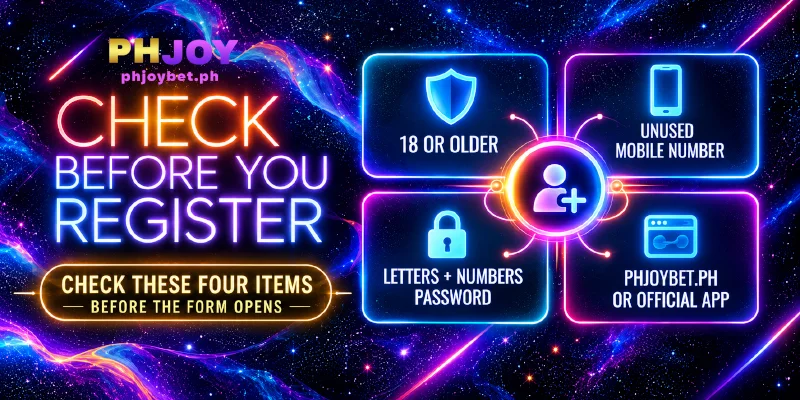
- An age of 18 or more. In the form’s last line you confirm your age, so tick that box only when the statement is true.
- A mobile number that is yours, that you will keep, and that no account uses yet, because the form rejects a number that is already registered. The number returns as the pre-filled Phone Number in Personal Information, and in the free spin events a wrong phone number means PHJOY cannot arrange delivery of the prize. Read the number back digit by digit before you finish PHJOY registration, because a typo in the number is easy to miss later.
- A password you use nowhere else, built from letters and numbers. A password reused from another site or wallet puts this account at risk the day that other site leaks.
- The right address: the official PHJOY site at phjoybet.ph in your browser, or the official app. For PHJOY registration the app is the recommended route, because the app keeps the account safer and avoids fake sites, and a fake site would collect your password and mobile number.
PHJOY Registration Takes Eight Actions, in Screen Order
With the four checks done, registering on PHJOY takes eight actions down the form, top to bottom. A red message under a field means the entry breaks that field’s rule; fix the entry before you move on.
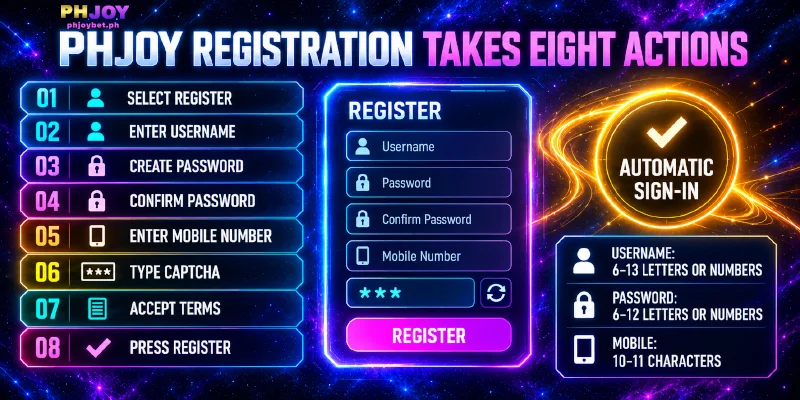
- Select Register in the top navigation, next to Login, to open the PHJOY sign up. A popup opens with two tabs, Login and Register, and the Register tab is selected. If you already hold an account, use the Login tab instead.
- Enter your Username in the Username field, using 6 to 13 letters or numbers and no special characters. Note the username down, because the username is the name you sign in with.
- Enter your Password in the Password field, using 6 to 12 letters or numbers, again with no special characters. Since symbols are not allowed, length and a mix of uppercase, lowercase and digits are what make a password hard to guess.
- Re-enter the same password in the Confirm password field. Both password fields mask what you type, so the second entry catches a slip in the first.
- Enter your mobile number in the Mobile number field, which takes 10 to 11 characters. Philippine mobile numbers are written locally as 11 digits starting with 09, or 10 digits without the first 0, so type the number in that local form. The +63 form runs to 12 or 13 characters and does not fit the field.
- Type the Captcha. The field shows a numeric code in an image on the right side of the field; type the digits as shown. The code is there to stop automated sign-ups.
- Tick the box that reads “I confirm that I am 18 years old and I have read the Terms and Services”. The Terms and Services link sits in the same sentence, and ticking states that you have read the terms. With the box ticked and no red message left under any field, the PHJOY register form is ready to submit.
- Pressing the Register button under the tick box completes PHJOY registration and signs you in automatically, so no separate login follows. The header shows ₱0.00 as your balance and a VIP0 badge on your avatar. VIP0 is the level you hold before you earn VIP 1. Because the sign-in is automatic, register on a phone or computer that only you use.
Each PHJOY register field’s limit sits in the table beside the red message that appears when an entry breaks the limit, so a red line under a field can be matched to a rule at a glance.
| Field | Limit | What the form shows when the limit is broken |
|---|---|---|
| Username | 6 to 13 letters or numbers | A red line asks for 6 to 13 characters, letters or numbers only, no special characters |
| Password | 6 to 12 letters or numbers | A red line asks for 6 to 12 characters, letters or numbers only, no special characters |
| Confirm password | Same entry as Password | “Incorrect confirmation input” |
| Mobile number | 10 to 11 characters | A red line asks for 10 to 11 characters |
| Captcha | The numeric code in the image | A popup opens after you press Register, and the field shows a new code |
Username and Password follow the same letters-and-numbers rule but differ by one character of length, so a 13-character entry that passes as a username fails as a password.
When you press Register, the PHJOY Register tab checks Username, Mobile number and Captcha, and each failed check opens a popup instead of signing you in. If the username is taken, pick another; if the number is registered, sign in on the Login tab when the account is yours; if the Captcha is wrong, enter the new code.
Use Personal Information Right After Sign-In to Save an Email
Once PHJOY registration has signed you in, open Personal Information in My Account, save an Email there and confirm that Phone Number already holds the number you registered with. My Account shows a Security Level score, and Personal Information is one of the settings that score recommends.
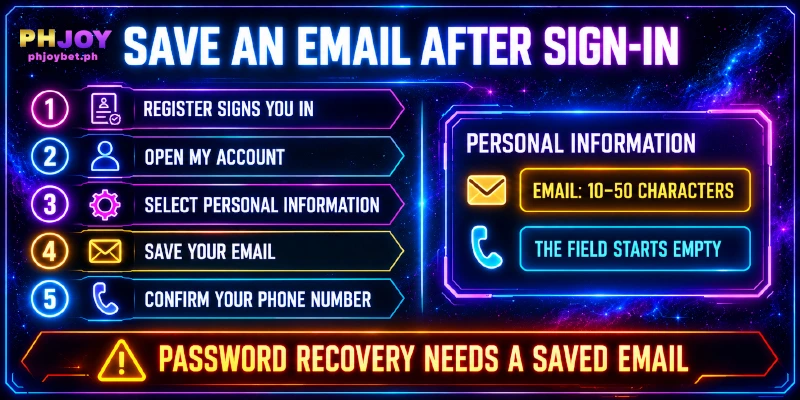
Email in Personal Information takes 10 to 50 characters and starts empty, because the Register tab never asked for an address. A saved Email is what password recovery depends on later, so the field is worth filling in on the first day.
Save the Email while you are still signed in, because once you are locked out you can no longer open Personal Information to add an address.
Two Newcomer Rewards, One Only for Accounts Without a Deposit
A new account also holds two newcomer rewards, and the two run on different conditions. New Player Red Packet is a voucher: open Reward Center in Personal Center, go to Receive Center and press Receive; the voucher lists the deadline as Permanent, so no date forces you to claim the voucher on the first day.
Register & Download is for accounts that have not deposited yet, and the reward pairs PHJOY registration with downloading the app, so settle the app download before a first deposit.
FAQ
Each question below starts from something the PHJOY register screen does not show.
Does a Second PHJOY Registration Earn a Second Set of Rewards?
No, most promotions allow one claim per player. Repeat claims that share an IP address (the network address of your connection), a linked wallet or a phone number lead to confiscated rewards and winnings.
Is a Deposit Required to Finish PHJOY Registration?
A deposit is not part of registering: the Register tab has no payment field, and the first deposit is a separate step made later from the Deposit page. You can create the account first and fund the account when you choose.
Does PHJOY Register Ask for an SMS Code?
No, the Register tab has no field for a code. Nothing in the form confirms that the number is yours, so you are the only check on the number.
Does PHJOY Registration Need an Invite or Referral Code?
None of the five entries takes an invite or referral code, so nothing has to be typed beyond the five entries and the tick box. A request to enter a code before you register does not come from the Register tab.
Registration Opens the Account, and a Saved Email Backs Up Password Recovery
You complete PHJOY registration in two stages: the Register form creates the account and signs you in, and the Email you save in My Account afterwards backs up password recovery. The second stage takes one visit to Personal Information, a step the Register form never prompts.