
Contact PHJOY by Problem: The Details Each Case Needs in the First Message
You choose the department by the problem when you contact PHJOY about a missing deposit, a wallet that will not link, a lost password, or a bonus that never arrived. Live Support, which runs 24/7 from the sidebar, takes all four, while [email protected] and (+63) 926 584 1703 are the other two channels. This page lists what each kind of problem needs in the first message to PHJOY customer service.
How the Chat Starts and What Each Problem Needs in the First Message
Live Support opens from the sidebar, starts by asking for your username, and then asks you to pick a department before you describe the problem. Other Concern, the department for every case outside the other four, accepts up to 2,000 characters for that description.
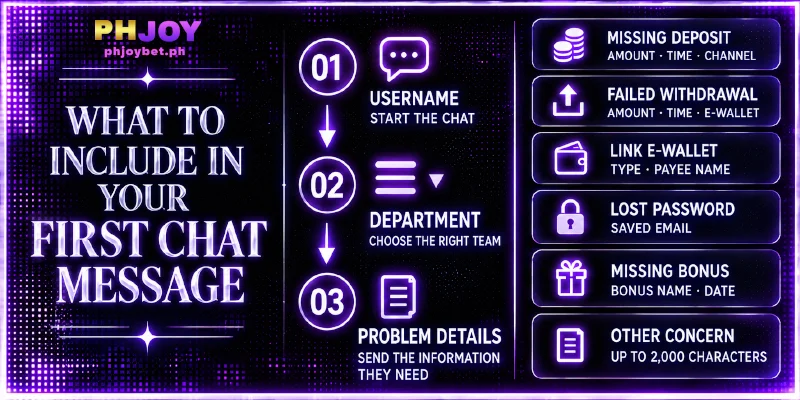
The table below sorts by the problem you are contacting PHJOY about, and the last column names items from screens you already use, so each is something you can look up before writing. For the wallet row, the About page explains why the payee name must match the name on your account.
| Problem | Department | Include in the first message |
|---|---|---|
| A payment left your wallet but is missing from your balance | Deposit and Withdrawal | Amount, payment time, and the channel name from the Deposit page, such as G-Cash Ch.20; for GCashQR, the Order No on the payment screen |
| A withdrawal request that did not go through | Deposit and Withdrawal | Amount, request time, and the e-wallet used, GCash or PayMaya |
| A GCash or PayMaya wallet to link or unlink | Bind and Unbind | The e-wallet type and the payee name entered in Link E-wallet, the Name on Card field |
| A login password you cannot recover | Forgot Password | The Email saved in Personal Information, if one is saved |
| A bonus or voucher that never arrived | Promotions and Bonuses | The bonus name from the Promotion page, such as First Deposit Bonus, and the date you met the bonus terms; for a voucher, the entry in Voucher records |
| Any other case | Other Concern | One full description, up to 2,000 characters |
Contact PHJOY by Email or Phone, and Check the Address Listed
The PHJOY contact details beside the chat come to three, and the Privacy Policy covers the personal details sent through them:
- Support email: [email protected]
- Support phone: (+63) 926 584 1703, dialed as 0926 584 1703 inside the Philippines
- Address: 24 Loyola St, Sampaloc, Manila, 1008 Metro Manila, Philippines
Email carries the full text of a message and the send time, which suits a case with several details, and opening the message with your username matches the way the chat begins. A phone call leaves no written record on your side, so note the time of the call and the answer customer service gave.
FAQ
These answers about contacting PHJOY cover the language of Live Support, what the chat never asks for, how long a missing deposit stays checkable, and where the official channels are listed.
Which Language Does Live Support Use?
Live Support runs in English. That matches the English language setting shown in the sidebar.
Does Live Support Ask for a Password?
No. The chat takes a username and a department, then your description, and a password is not part of any step.
How Long Can a Missing Deposit Be Checked in Deposit History?
For up to 3 days. A payment that has not arrived belongs with Live Support, under Deposit and Withdrawal, while Deposit History still lists it.
Are There Official Facebook and Telegram Channels?
Yes, on both Facebook and Telegram. Both sit under the Official Channel label in the sidebar.
Use the Department Menu First, Then Labels From Screens You Already Use
Contacting PHJOY works in two moves: you route the request first and write the message second, using labels such as the channel name on the Deposit page or the Name on Card in Link E-wallet. Email and phone keep the same order.