
PHJOY Login: Two Fields to Sign In, One Saved Email for Resets
PHJOY login takes two fields, a Username and a Password, and that is the catch: when a sign-in fails, the dialog never says which of the two was wrong. You get back in by following an order: retype, then reset, then support, and the Forgot Password form resets a password only when an Email is already saved in your account’s Personal Information form.
What the Login Box Asks For, and the Email Reset Needs Saved First
The PHJOY login box has a Username field, a Password field, a Remember tick box, a Forgot Password link and a Login button. Under that button, a line says you are 18 years old and have read the Terms and Services; unlike the Register tab, the login box does not ask you to tick that line.
On sign-up, the Register tab collects a Mobile number but no Email, so a new account has no Email on file until you add one, while the Forgot Password form asks for exactly that saved address. You will not notice the gap, because nothing in the PHJOY login box asks for the Email.
Letters and numbers in upper and lower case make up the password PHJOY recommends, so a single capital typed as lowercase is the first thing to rule out when a login at PHJOY fails.
PHJOY Login Takes Five Steps, From Address Bar to Balance
Before the first click of a PHJOY login, check that the address bar shows phjoybet.ph, or open the login box from the official app. A wrong capital is one way a sign-in goes wrong; a look-alike page is another.
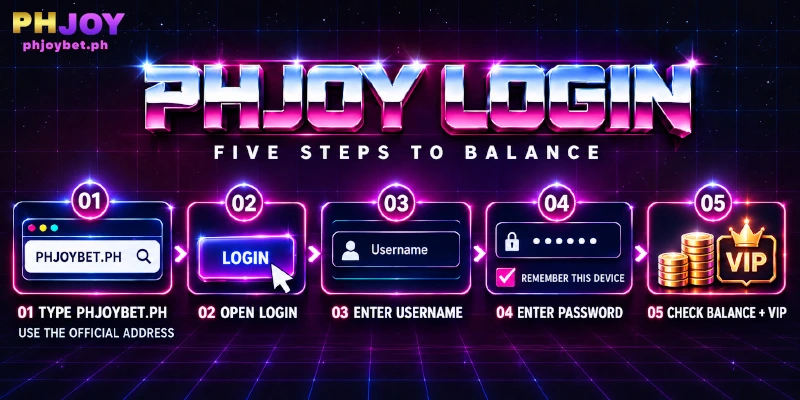
Type the address yourself rather than following a link from a message, because a Username and Password typed into a look-alike page belong to whoever built the page. For a login at PHJOY, the steps then run down the box, and only the Remember choice depends on your device.
- Click Login at the top right of the page. The box opens on the Login tab.
- Type your Username in the first field.
- Type your Password in the second field.
- Decide on Remember. Remember suits a device only you use; on a shared device, leave the box unticked.
- Click the Login button under the fields.
Once your login to the PHJOY casino succeeds, the page header shows your ₱ balance, the deposit and withdrawal icons, and an avatar with your VIP level. A header that still shows Login and Register means the sign-in has not gone through.
Adding the Email That Password Reset Needs
You add the Email in the Personal Information form, which sits under My Account once your login at PHJOY succeeds. The form holds the address next to a Withdrawer Name, a Nickname and a Phone Number that is already filled in; enter your Email, complete what the form still asks for and click Submit.
Use an address you can open today and check its spelling before you submit, because the Forgot Password form later accepts only the Email saved here, and the Email field takes 10 to 50 characters. A typo saved today is the address a login at PHJOY must match on the day you need a reset.
What the Wrong Username or Password Message Says, Stage by Stage
When a login at PHJOY fails, one dialog appears whichever field was wrong. The dialog reads: “Unable to log in. Please verify that your username and password are correct, or use the “Forgot Password” option to reset your password.”
A form that named the wrong field would also confirm which Usernames exist, and a single generic message like this one withholds that confirmation.
Further down, the dialog adds that a persisting problem may be related to your account status and points to Customer Support. A short reference code in brackets closes the text, and one OK button dismisses the dialog. The table reads the message as the two stages the dialog describes.
| Stage | What the dialog says | What you do |
|---|---|---|
| First | Check username and password, or use Forgot Password | Retype both fields by hand; reset only if that fails |
| Second | The issue persists and may relate to your account status; contact Customer Support | Go to Live Support, the support channel in the sidebar |
Live Support takes over at the second stage of PHJOY’s login dialog because a new password does not address an account status. The first stage is a retype, and the checks in the next section show what that retype should cover.
Resist resetting first: the dialog does not say which field failed, so you would replace a password that may have been right all along.
Three Slips Can Trigger a PHJOY Login Error, and Each Has a Fix
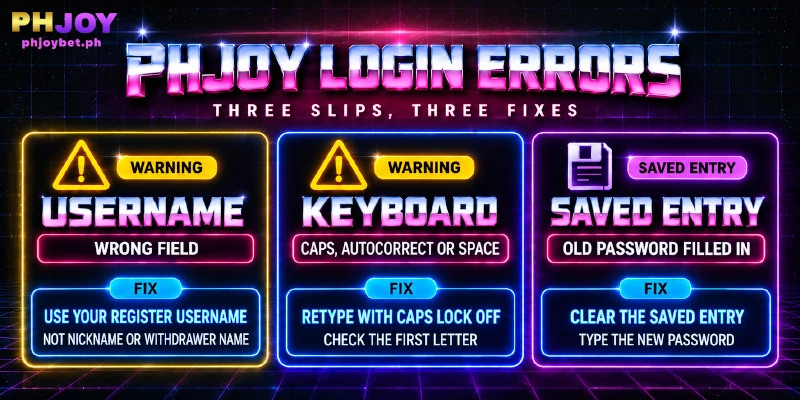
If you can’t log in at PHJOY, three places are worth ruling out before a reset: the typed details, the keyboard and a saved entry. One retype that covers all three tells you more than repeating the same input. The table follows the order of the login box, field by field.
| Check | What goes wrong | What to do |
|---|---|---|
| Username | The PHJOY login box asks for the Username chosen on the Register tab; the Nickname and Withdrawer Name in Personal Information are different entries | Retype the Username from sign-up and keep Nickname and Withdrawer Name out of that field |
| Keyboard | A phone keyboard can capitalize the first letter of a field, autocorrect can add a trailing space, and Caps Lock flips every letter | Check the first letter, switch Caps Lock off and look for a space after the last character |
| Saved entry | A browser or password manager can keep filling in the old password after a reset | Delete the saved entry, type the new password by hand and let the browser store the new one |
Two Ways Back In: Forgot Password With a Saved Email, Live Support Without
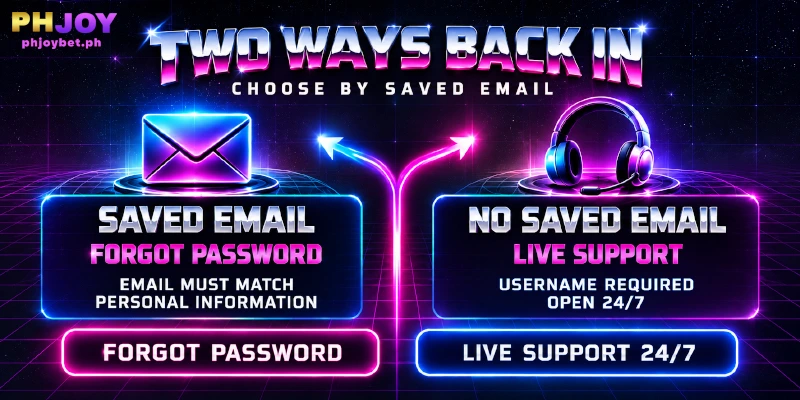
You choose the route by one fact: whether your account has an Email saved in Personal Information. The table sets the two routes for a failed PHJOY login side by side.
| Route | Needed | Use when |
|---|---|---|
| Forgot Password form | Your Username and the saved Email | An Email is saved in Personal Information |
| Live Support, FORGOT PASSWORD department | Your Username | No Email is saved |
Forgot Password Form: Needs the Saved Email
After a failed login at PHJOY, the Forgot Password form works only if the Email you enter is the one saved in Personal Information.
- Click the Forgot Password link next to Remember in the login box.
- Enter your Username in the “Retrieve your password” box.
- Enter the saved Email.
- Click OK.
Forgot Password asks for the Username and the Email only, so you start a reset without the old password.
Live Support: Starts With Your Username
Live Support sits in the sidebar, answers in English and is open 24/7. Live Support asks for your Username first, then for a department.
If you cannot log in at PHJOY and have no saved Email, choose the FORGOT PASSWORD department and describe what happened. Written questions also go to [email protected].
Add the Email while your login at PHJOY still works: the Forgot Password form needs the Email saved beforehand, and the Personal Information form that stores the address sits inside the account you would be locked out of.
An Account Status Message Goes to Support With Four Details
When the second stage of the dialog appears after a PHJOY login fails, the message goes to Live Support, and four details make that first message complete.
- Your Username.
- The dialog text, including the short reference code in brackets at the end of the text.
- What you already tried, such as retyping both fields or running a reset.
- Whether an Email is saved in Personal Information.
None of the departments carries a name that fits an account status, so Other Concern, the department where you describe the concern in your own words, is the one to choose. The Other Concern box takes up to 2,000 characters, which leaves room for all four details.
While support looks into a login at PHJOY that keeps failing, do not open a second account.
Promotions such as Weekly Wednesday and Free Angpao Everyday carry a repetition rule: one claim per player, and PHJOY confiscates rewards and profits when the same IP address, linked account or phone number repeats. A second account opened from the same phone or e-wallet and used to claim a promotion falls under that rule.
Ten Rewards Depend on the Day or Hour You Log In
Access is not all a login does: ten rewards ask for a login at PHJOY on a set day or hour, so a login is worth more on some days than on others. The table sorts them by the day you log in and by what else each one needs.
| Reward | Log in on | Needed besides the login |
|---|---|---|
| 2nd Day Free Cashback | Day 2 after your first deposit | The first deposit |
| 4th Day Free Spin | Day 4 | Three deposits within three days |
| Spin on JILI & PG, Bet, Win and Lose daily rewards | The day after you play | Play on the day before |
| Weekly Wednesday | Every Wednesday | A share |
| Every 8th Monthly | The 8th of each month | A share |
| VIP weekly salary | Every Sunday | VIP status and a deposit of 100 or more that week |
| Free Angpao Everyday | Every hour | The official app |
Eight of the ten are claimed at Reward Center, an item in the sidebar, and each reward’s values, turnover requirements and exclusions sit in the Promotion list. The four daily rewards must be claimed before 4:00 PM on the day after you play, so log in early that day instead of leaving the claim for the evening.
Alone, a Sunday login is not enough for the VIP weekly salary; the deposit of 100 or more has to fall inside the same week.
FAQ
Three points stay open after the steps above, and each answer below covers one of them without repeating the steps.
Do I Need to Upload ID Documents to Log In?
No, PHJOY login needs only a Username and a Password, and PHJOY does not ask members for document verification. The one exception is the VIP 3 and above birthday gift, where you show a valid I.D. to customer service.
Does the Account Status Message Mean My Account Is Locked?
Not by itself. PHJOY’s login dialog never uses the word locked, and it names no reason for the account status. A lock is one possible reading, and Live Support is the place to ask what the status is.
Is the Login Password the Same as the Transaction Password?
No, the Transaction Password is a separate password that applies to every fund operation, such as a withdrawal. The Forgot Password link in PHJOY’s login box is for the password you type at sign-in.
Only the Saved Email Can Be Prepared Before a PHJOY Login Fails
PHJOY login is two fields and one button, so a failed sign-in comes down to three things: the typed details, an Email that was never saved, or an account status that the dialog hands over to support. Only the Email can be prepared in advance, with a minute in Personal Information before a login at PHJOY ever fails.