
About PHJOY: Sign-Up Without Documents, Withdrawals With a Name Match
About PHJOY starts with who can join: phjoybet.ph opens accounts to players aged 18 and over in the Philippines, in English and in pesos. You upload no ID documents at sign-up, and the name check sits at withdrawal, so the Withdrawer Name on your profile has to match the name on the wallet that receives your money.
About PHJOY: Who Can Join and Which Address to Sign In At
Registration at phjoybet.ph requires players in the Philippines to confirm that they are 18 or older. A tick box on the Register screen pairs the age confirmation with an acknowledgment of the Terms and Services, and the same box appears on the Login screen, so the confirmation returns at every sign-in.
Sign in at that address or through the official app, which is meant to protect accounts from fake sites. A look-alike page that asks for your username and password at a different address is therefore the first thing to rule out before you type anything.
Responsible Gaming starts from the same age line and leaves the budget and the hours of play with the member.
What Stands Before a First Withdrawal: Three Settings and One Name Match
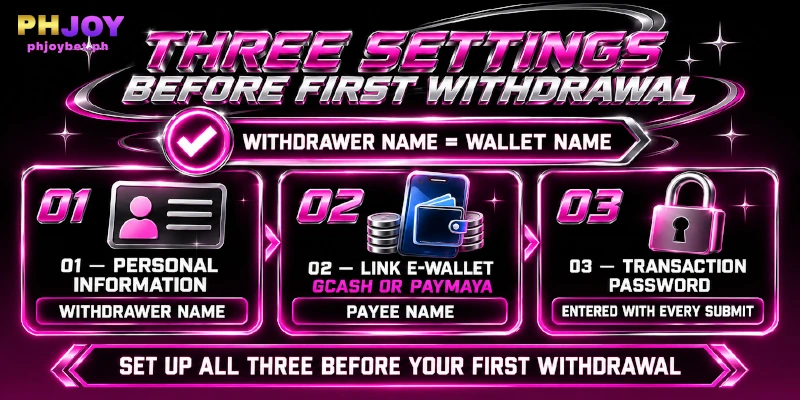
Before a first withdrawal, My Account asks for three settings and one name match, and every one of them can be checked from the account itself. Personal Information holds the Withdrawer Name.
Link E-wallet holds a GCash or PayMaya wallet and the payee’s full name, and Transaction Password is a second password you enter whenever you submit a withdrawal.
Name Matching Decides Whether a Withdrawal Goes Through
Name matching is the check that decides a withdrawal. The Withdrawer Name, which runs 2 to 25 characters, must match the name on the linked wallet, so money leaves only to a wallet registered under the same name as the profile.
Each GCash or PayMaya wallet is registered under a holder’s name, which is the name the profile is compared against. A wallet registered to Maria Santos Reyes pairs with a Withdrawer Name of Maria Santos Reyes, while a profile that reads Maria Reyes leaves the two names different, and the withdrawal fails.
Registration has no name field, so nothing at sign-up flags a name that differs from the wallet’s. Enter the Withdrawer Name and the wallet’s payee name in the same sitting, copied exactly as the wallet app displays the name.
A Second Password and a Security Level Back the Match
A second lock sits behind the login: someone who learns only your login password cannot submit a withdrawal, because that step asks for the separate Transaction Password you set in My Account. The password is entered with each withdrawal, so the second lock applies to every request and not just the first.
My Account shows a Security Level in points, and the recommended settings are those same three. Finishing them before a first withdrawal answers three questions at once: whose money this is, which wallet receives the money, and who approved the request.
Your PHJOY Account Keeps Betting, Account, and Profit and Loss Records
Personal Center, the account menu, lists Betting Record, Account Record, and Profit And Loss as three separate entries, and money moving in and out has its own places, each tied to the page where the money moves:
- Deposit History sits on the Deposit page, and a deposit record can be checked for up to 3 days.
- The Withdrawal page carries a Recent Withdrawal panel.
- Manual rebate opens My Rebates, with a settlement date and a total per game type, and has a Rebate History entry.
- Reward Center keeps Voucher records for the vouchers you receive.
Live Support Runs 24/7 in English and Opens With Your Username
Live Support answers around the clock in English, and a question about the PHJOY account starts with your username before the department menu appears. Three departments cover the questions this page raises:
- Bind and Unbind: a name that will not match the wallet.
- Deposit and Withdrawal: a payment missing from your record.
- Other Concern: everything else.
FAQ
These four answers about the PHJOY account follow the order in which an account is set up and used: identity, wallets, bank accounts, and the app.
Does PHJOY Ever Ask for ID?
Not when you register or when you set up a wallet for withdrawals, because verification runs on Personal Information, Link E-wallet, and Transaction Password. The one exception is the VIP birthday gift, which starts at VIP 3 and is claimed by presenting a valid I.D. to customer service.
How Many Wallets Can One Account Link?
Two. Link E-wallet accepts GCash or PayMaya and shows the count as 0/2 before you add one, so a second wallet fits and a third does not.
Can a Withdrawal Go to a Bank Account?
No. Withdrawals pay out to e-wallets only, GCash or PayMaya, so a bank account has no place to be linked.
Where Does the Official PHJOY App Come From?
From the website. The sidebar entry APP Download shows a QR code for iOS or Android, scanning the code opens the download page, and the iOS version is not installed from the App Store.
At PHJOY, the Account Is Checked When Money Leaves, Not When You Join
This PHJOY about us page describes one design: sign-up takes a username, a password, and a mobile number, while withdrawal takes matching names and a second password. The name entered once in Personal Information is the detail every later withdrawal is compared against.